Clermont County provides public court record search options that help users find case information through online databases maintained by local courts. Court files may contain details about civil disputes, criminal proceedings, probate matters, family law cases, hearings, filings, judgments, and docket activity. Many people use case search tools to check court dates, verify case status, review filed documents, or locate records connected to a party name or case number. Public court records support transparency and make legal information easier to review.
Clermont County court records systems allow users to search cases through several methods, including party name searches, case number lookups, filing date searches, and docket record searches. Court databases often display information such as case type, filing history, hearing schedules, court orders, and disposition records. These search tools help attorneys, researchers, journalists, businesses, and members of the public review court activity and monitor ongoing proceedings within Clermont County courts.
How to Search Clermont County Court Cases Online
The Clermont County Common Pleas Court case search tool helps users review court records, track case status, and view docket information online. As part of the broader Clermont County Court system, it provides direct online court database access for civil and criminal cases handled by the Common Pleas Court. This judicial search portal is managed by the Clermont County Clerk of Courts and is used for public record lookup, case tracking, and reviewing judicial filings.
Open the official case search portal
The first step is visiting the official Common Pleas Court search page: https://eservices.clermontclerk.org/commonpleas/search.page?x=2s2yFFcnFufWN1IUh5kC4g
Choose a search option
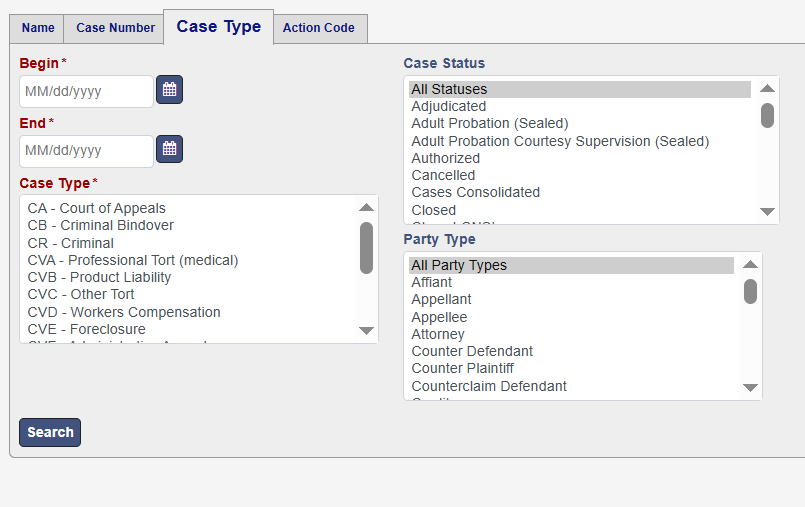
Users can select how they want to locate legal records. The system usually provides:
- Case number search (fastest method)
- Party name search (person or business)
- Attorney search (lawyer-based lookup)
- Case type search (civil or criminal cases)
Each option helps locate judicial filings in a different way.
Enter case details
After selecting a search method, users fill in required fields such as:
- Case number (most accurate result)
- First name and last name
- Business or organization name
- Filing date range
Partial name searches may still show results if full details are not available.
Apply filters to narrow results
Filters help refine large result lists and improve search accuracy.
Common filters include:
- Filing date range
- Case status (open, closed, pending)
- Court division (civil, criminal, domestic relations)
- Judge or assigned court section
These filters help users quickly locate specific court records.
Review search results
After running the search, the system displays matching records.
Each result may show:
- Case number
- Party names
- Filing date
- Court division
- Current case status
Users can scan the list and select the correct case.
Open case details
Clicking a case opens full record information.
Inside the case file, users can review:
- Case summary
- Party information
- Attorney details
- Judge assignment
- Filing history
This section provides full visibility into the case structure.
Check docket entries
The docket section shows the full timeline of case activity.
It may include:
- Motions filed
- Court orders
- Hearings scheduled
- Judgments issued
- Updates from the court
This section is key for tracking judicial filings and case progress.
Check case status
Each case shows a current status label, such as:
- Open
- Pending
- Closed
- Dismissed
- Scheduled
This helps users understand the current stage of the case.
Review hearing details
If available, hearing information may include:
- Hearing date and time
- Courtroom location
- Judge assigned
- Upcoming court events
This helps users stay updated on scheduled proceedings.
What users can find in this tool
The Clermont County Common Pleas Court search system allows users to:
- Locate legal records
- Review judicial filings
- Track case progress
- View docket history
- Check public court information
- Monitor civil and criminal cases
Types of Cases Available Through Clermont County Court Searches
Clermont County Court Case Search systems provide structured judicial filing records across multiple court divisions. Users can perform court file lookup to review criminal, civil, probate, domestic relations, juvenile, and municipal court matters. Each division handles specific legal record archives, making it easier to locate accurate information within the court proceedings database. These records support public review of cases, hearings, and legal actions filed in Clermont County courts through an organized online system designed for efficient case identification.
Criminal Case Records
Criminal case records in Clermont County include offenses handled under Ohio law and processed through Common Pleas Court or Municipal Court. These judicial filing records involve felony and misdemeanor charges, arrest-related documentation, hearings, and sentencing updates. Users performing court file lookup can review case status, charges, and court actions tied to criminal matters. These records are part of the broader court proceedings database, offering structured legal record archives that track prosecution activity, court decisions, and ongoing or closed criminal cases.
Civil Litigation Files
Civil litigation files cover disputes between parties that do not involve criminal charges. These cases include contract disagreements, property issues, debt claims, and personal injury matters filed within Clermont County courts. Users can perform court file lookup to review complaints, responses, motions, and final judgments. These civil records form part of structured judicial filing records maintained in legal record archives. The Clermont County Court Case Search system allows users to track case progress and review court proceedings database entries for civil matters.
Probate Proceedings
Probate proceedings in Clermont County involve legal matters related to estates, wills, guardianships, and name changes. These cases are processed through the probate court division and recorded in official judicial filing records. Users conducting court file lookup can review estate administration files, inheritance distribution details, and guardianship arrangements. These probate matters form an important part of legal record archives and support structured tracking within the court proceedings database. Each record reflects court-managed decisions related to personal and estate-related legal issues.
Family Court Records (Domestic Relations)
Family court records, also known as domestic relations cases, involve legal matters such as divorce, child custody, child support, and spousal support. These judicial filing records are maintained within Clermont County’s domestic relations division and are frequently searched through court file lookup systems. Users can review case filings, court orders, and custody arrangements. These records form part of the broader court proceedings database and provide structured legal record archives related to family disputes, parenting plans, and financial support decisions issued by the court.
Juvenile Proceedings
Juvenile proceedings involve cases concerning individuals under 18 years of age and are handled with restricted public access due to privacy protections. These cases may include delinquency matters, dependency issues, neglect concerns, and court-ordered rehabilitation programs. Users performing court file lookup may find limited information depending on legal restrictions. These juvenile records are maintained within controlled judicial filing records and contribute to the broader court proceedings database while ensuring sensitive details remain protected under applicable laws governing juvenile legal record archives.
Municipal Court Cases
Municipal court cases in Clermont County include lower-level offenses such as traffic violations, misdemeanors, ordinance violations, and small claims disputes. These cases are often the first stage of judicial processing and are recorded within official judicial filing records. Users conducting court file lookup can review case status, hearings, and basic case details. These records are part of the court proceedings database and provide accessible legal record archives for local matters handled at the municipal level within the county court system.
Searching by Case Number
Case number search is the most accurate method in the Clermont County Court Case Search system because every case receives a unique legal reference number at the time of filing. This identifier connects directly to one specific court file, which removes confusion caused by similar party names or repeated filings. Users rely on this method for precise court file lookup and faster results. It also helps locate exact judicial filing records within the court proceedings database without sorting through unrelated entries or partial matches.
Why Case Numbers Give the Most Accurate Results
Case numbers provide the highest accuracy in court record searches because they remain fixed throughout the entire legal process. Each number is tied to a single case file inside legal record archives, which prevents duplication or overlap. When users perform a case number search, the system immediately pulls the exact record without filtering multiple results. This makes it more reliable than name-based searches and improves efficiency in case tracking records across civil, criminal, and other court divisions.
Case Number Search Process
Case number search follows a structured process that allows users to quickly locate court records through the online system. It starts with identifying the correct case number from legal documents or court notices. Then users enter it into the search field and submit the request. The system returns a single matching record linked to that identifier. This method works best for direct court file lookup and helps users avoid unrelated results commonly found in broader searches.
- Locate case number from official court document
- Verify correct court division before searching
- Enter full case number into search field
- Submit search request
- Open matching case record
Using Docket Numbers and Filing References
Docket numbers and filing references help users locate records when a full case number is not available. These identifiers are tied to specific filings, motions, or court actions within a case. When entered into the system, they assist in narrowing results inside the court proceedings database. This method supports legal reference number lookup for users trying to trace specific events within judicial filing records. It is especially useful when searching through complex cases with multiple filings or similar party names.
Reviewing Case Timeline with Case Number
After completing a case number search, users can open the case record to review the full timeline of legal activity. This timeline displays all judicial filing records in chronological order, showing how the case progressed from filing to final decision. Users can track motions, hearings, court orders, and judgments within one structured view. This helps build a clear picture of case tracking records and supports detailed review of the entire legal process through official court proceedings database entries.
- Initial filing details
- Motions and responses
- Hearing schedules
- Court orders and rulings
- Final judgment status
Benefits of Case Number-Based Search
Case number-based search provides strong advantages for users performing court file lookup in Clermont County. It delivers direct results tied to a single legal record, which reduces search time and improves accuracy. Users do not need to filter through multiple entries, making it ideal for reviewing judicial filing records. It also supports faster tracking of case updates across civil, criminal, and other divisions. This method remains the most efficient option for precise access to legal record archives and court proceedings database information.
Searching by Party Name
Party name search in the Clermont County Court Case Search system allows users to locate records using the names of individuals or businesses involved in legal matters. This includes plaintiff, defendant, petitioner, or respondent details depending on the case type. It works within the public case search database and supports case lookup Clermont County when a case number is not available. Users can review civil, criminal, probate, and family-related judicial filing records through this method of name-based court lookup.
How Party Name Search Works
Party name search operates by matching entered names with records stored in the court proceedings database. Users may enter a full legal name, partial name, or business title to retrieve related judicial filing records. The system then lists all cases connected to that name across different court divisions. This litigant search system is commonly used for reviewing multiple cases linked to one person or organization. It helps users track civil disputes, criminal matters, and domestic relations cases within legal record archives.
Entering Accurate Party Details
Accuracy plays a major role in party name search because small spelling differences can change results. Users should enter the full legal name whenever possible to improve matching accuracy in the court file lookup system. If the complete name is unknown, partial entries can still return results, though they may include unrelated cases. This step improves name-based court lookup performance and helps users filter relevant judicial filing records more effectively within the public case search database.
- Enter full legal name when available
- Use correct spelling of first and last name
- Try partial names if full details are missing
- Include business or organization names if applicable
Common Limitations of Name-Based Court Lookup
Party name search has limitations because multiple individuals or businesses may share similar or identical names. This often results in large result lists within the public case search database, making it harder to locate specific records. In some situations, sealed, restricted, or juvenile records may not appear due to legal privacy rules. Name variations, misspellings, and aliases can also affect accuracy. These challenges require users to refine searches when reviewing judicial filing records in the system.
Best Practices for Better Search Results
Better results in party name search depend on how accurately and strategically users enter information. Adding filters such as filing date range and case type helps reduce unrelated results. Users should also test alternate spellings or variations of names to improve match accuracy. These practices enhance case lookup Clermont County performance and help users locate correct legal record archives more efficiently. Applying structured search methods improves clarity when working with judicial filing records across different court divisions.
- Enter full legal name when possible
- Check alternate spellings or variations
- Narrow results using filing date filters
- Apply case type or division filters
What Users Can Find in Party Name Search
Party name search provides access to multiple types of judicial filing records linked to individuals or businesses. Users can view case status, docket activity, court actions, and hearing details tied to specific parties. This includes civil lawsuits, criminal charges, probate matters, and family court cases. The system helps track case progress across divisions and supports structured review of legal record archives. It is widely used for monitoring ongoing or past cases within the Clermont County court proceedings database.
Court Case Information and Case Status
Court records in the Clermont County online case access system provide detailed insight into how a case progresses through different legal stages. Users performing a court records search can review filings, motions, hearings, judgments, and updates linked to each matter. These entries form a complete procedural case history within the court proceedings database. Each update reflects judicial activity records that track how a case moves from filing to resolution through a structured legal filing timeline maintained by the court system.
Filing History in Court Records
Filing history shows every document submitted during a case from the initial complaint or charge onward. These entries help users follow how legal action begins and develops across time. Each filing is stored in chronological order within legal record archives, making it easier to review case progress step by step. Users using online case access can view motions, responses, and supporting documents. This section forms the base of procedural case history and helps explain how the case was built from the beginning.
Hearing Dates and Scheduled Events
Hearing records provide details about court appearances scheduled during a case lifecycle. These entries include dates, courtroom locations, and assigned judicial officers. Users performing a court records search can track upcoming proceedings and past hearings through these updates. Each entry is part of judicial activity records that reflect how the case moves forward in real time. Hearing data supports case tracking records by showing when parties must appear and how the court schedules actions within the legal filing timeline.
- Hearing date and time
- Courtroom assignment
- Judge information
- Scheduled court events
Court Orders and Motions
Court orders and motions represent formal legal requests and decisions recorded during a case. Motions are filed by parties asking the court for specific rulings, while orders are official decisions issued by the judge. These records are stored within legal filing timelines and help users follow how arguments are processed. Users reviewing online case access can track each motion and ruling to understand judicial reasoning. These entries form an important part of judicial activity records and procedural case history within the system.
Judgments and Final Decisions
Judgments reflect the final outcome of a case after the court completes its review. These records may include verdicts, dismissals, settlements, or sentencing outcomes depending on the case type. Users performing a court records search can find these results within the case file once the matter concludes. Judgments represent the final stage of procedural case history and confirm how the dispute was resolved. These entries are a key part of legal record archives because they officially close the case.
Case Status Updates and Tracking
Case status updates show the current condition of a case within the court system at any given time. Common statuses include open, pending, scheduled, closed, or dismissed depending on case progress. Each update is tied to new judicial activity records added by the court. Users using online case access can monitor these changes to understand real-time progress. Status tracking helps organize case tracking records and provides a clear snapshot of where the case stands within the legal filing timeline.
Court Dockets and Case Timeline Records
Court docket entries in the Clermont County court system form a structured legal event timeline that shows how a case progresses from start to finish. Each entry recorded in the docket management system represents a specific judicial action such as filings, hearings, motions, or court orders. Users performing a court file lookup can follow these entries to understand the full case movement inside the court proceedings records. This timeline helps explain how each step connects within the broader case lookup Clermont County process.
Complaint Filing in Court Dockets
The docket timeline begins with the complaint filing, which officially opens a case in the court system. This entry includes initial claims, charges, or petitions submitted by the filing party. It becomes the foundation of the entire legal record archive and is assigned a unique case reference number. Users reviewing court file lookup results can identify when and how the case started. This first entry is essential in building the procedural case history and setting the direction for all future judicial activity records.
Motions Recorded in the Case Timeline
Motions appear in the docket as formal requests submitted by either party during the case process. These filings may ask the court to dismiss claims, request evidence, or modify earlier decisions. Each motion is recorded within the legal event timeline, allowing users to track how arguments develop over time. Through case lookup Clermont County systems, users can review these procedural updates and understand how each motion impacts the direction of the case within structured court proceedings records.
Hearings and Court Proceedings
Hearings are scheduled court sessions where both parties present arguments, evidence, or testimony before a judge. These entries are recorded in the docket management system with specific dates and courtroom details. Users performing a court file lookup can follow hearing schedules to track case progress in real time. Each hearing becomes part of the legal event timeline and contributes to the procedural case history. These records help users understand how court proceedings move forward through structured judicial activity.
- Hearing dates
- Courtroom assignments
- Judge details
- Scheduled proceedings
Court Orders and Judicial Actions
Court orders are official decisions issued by a judge during different stages of a case. These entries are recorded in the docket and reflect rulings on motions, procedural requests, or case management decisions. Users reviewing court proceedings records can track how each order influences case direction. These updates are essential in the legal event timeline because they show how judicial authority shapes outcomes. Court file lookup systems use these entries to maintain complete and structured judicial activity records for public reference.
Final Disposition of the Case
The final disposition marks the end of the case and shows the court’s final decision. This may include dismissal, settlement, judgment, or sentencing depending on case type. It becomes the last entry in the docket management system and completes the procedural case history. Users performing case lookup Clermont County searches can review this section to understand the final outcome. This entry is important because it closes the legal event timeline and finalizes the court proceedings records for that matter.
Public Access to Court Records in Ohio
Ohio provides public access to many court records under state public access laws that support judicial transparency and accountability. Through a public records search or court records search, users can view case details such as filings, hearings, and final outcomes in most civil, criminal, and domestic relations matters. These records are part of the state’s commitment to open judicial systems, allowing citizens to review court activity while still respecting privacy protections for sensitive cases and restricted legal matters.
What Court Records Are Available Online
Most Ohio counties, including Clermont County, provide online case access systems that display a wide range of court information. Users can review docket entries, party names, case status, and filing histories through digital court databases. These systems support court file lookup for civil lawsuits, criminal cases, probate matters, and family law disputes. Public access laws allow visibility into judicial filing records that are not sealed or restricted, making online case access a key tool for reviewing court proceedings records.
- Civil case filings
- Criminal case records (public portion)
- Probate court matters
- Domestic relations cases
- Hearing schedules and docket entries
Judicial Transparency and Public Access Laws
Ohio public access laws are designed to maintain judicial transparency while balancing privacy protections. These laws allow the public to review many court records search results, ensuring accountability in the legal system. Court proceedings records are generally considered public unless a statute or court order restricts access. This system supports fairness and openness in legal processes while allowing users to perform public records search activities for informational or legal review purposes across different court divisions.
Restricted and Confidential Court Records
Not all court records in Ohio are available for public viewing. Certain cases are sealed or restricted to protect privacy and sensitive information. These limitations apply to juvenile cases, adoption records, sealed criminal cases, and some family law matters. When restricted, these judicial filing records will not appear in online case access systems. This ensures compliance with public access laws while protecting individuals involved in sensitive legal proceedings within the court proceedings database.
- Juvenile court records
- Adoption and custody sealed files
- Expunged criminal records
- Protected family law cases
- Confidential court orders
Limits of Online Court Record Search
While online court records search tools provide wide access, they do not always display complete case files. Some older records may not be digitized, and sensitive documents may remain unavailable due to legal restrictions. Users performing a public records search may only see summaries instead of full documents. These limitations exist to balance judicial transparency with privacy protection. Even with partial access, online systems still provide useful information for tracking case status and reviewing available court proceedings records.
Summary of Public Access in Ohio Courts
Ohio’s court system allows broad access to judicial information through structured online databases and public records search tools. Users can review most civil, criminal, probate, and domestic relations cases through court records search platforms. However, sealed or confidential matters remain protected under law. This balance ensures both transparency and privacy within the legal system, allowing public review of court proceedings records while maintaining necessary restrictions on sensitive judicial filing records.
Frequently Asked Questions
This section answers common questions related to Clermont County Court Case Search and helps users understand how online court access works. It explains how to perform a case lookup Clermont County using different methods such as case number and party name. Users can also learn what type of case information search results appear in public legal records, how often updates occur, and what limitations exist in online court systems for reviewing judicial filings and case details.
How do I search Clermont County court cases online?
Users can search Clermont County court cases through official online court access portals provided by the county. The process usually starts by selecting a search method such as case number or party name, then entering relevant details into the system. After submitting the search, the platform displays matching records from public legal records. Users can open a case file to review docket entries, filing history, and case status. This method supports efficient case information search across different court divisions.
Can I search court records by case number?
Yes, case number search is the most accurate method within the Clermont County Court Case Search system. Each case is assigned a unique identifier that directly links to a single court record. Users performing a case lookup Clermont County can enter this number to view exact judicial filings without unrelated results. This method provides direct online court access to docket information, case status, and filing history, making it the fastest way to locate specific public legal records.
Can I search court records by party name?
Court records can also be searched using party names such as plaintiff, defendant, petitioner, respondent, or business names. This option is useful when the case number is not available. Users performing a case information search may see multiple results if names are common or similar. Filtering options such as date range or case type help narrow results. This method is widely used in online court access systems for reviewing public legal records tied to individuals or organizations.
Are Clermont County court records public?
Most Clermont County court records are public under Ohio public access laws. These records include civil, criminal, probate, and domestic relations cases that are not sealed or restricted. Users can perform a public legal records search to review filings, hearings, and case outcomes. However, certain records such as juvenile cases, sealed documents, or confidential filings are not available through online court access. This balance supports transparency while protecting sensitive judicial information within the court system.
What information appears in a court case file?
A court case file typically includes detailed information about the legal proceedings from start to finish. Users can view filing history, party details, court orders, motions, hearing schedules, and final judgments. These records are part of the case information search system and help users track judicial activity. Through online court access, individuals can review how a case progresses within the court system. This structured data forms the basis of public legal records available for review.
How often are court records updated?
Court records in Clermont County are updated regularly as new filings and judicial actions are entered into the system. Updates may occur daily or as court staff process new documents and schedule changes. Users performing a Clermont County Court Case Search can see new docket entries, status updates, and hearing information once they are recorded. However, delays may occur depending on court processing times. This ensures that public legal records reflect the most recent available case information.